Bank statement to CSV
Upload a PDF statement (or a scan or photo) and download a CSV with one row per transaction: date, description, signed amount and balance. It opens in Excel, Google Sheets, or anything else that imports CSV — QuickBooks, Xero, Sage, a budgeting app — which makes it the safest format to hand to another tool.
Upload a file
What the CSV file contains
- A header row, then one row per transaction
- Date, description, and amount in their own comma-separated fields
- Descriptions containing commas kept intact, wrapped in quotes
- Plain UTF-8 text, so no spreadsheet program is required to read it
- Dates written as YYYY-MM-DD, so a US and a UK statement come out the same and no importer swaps day and month
A real conversion, start to finish
The statement
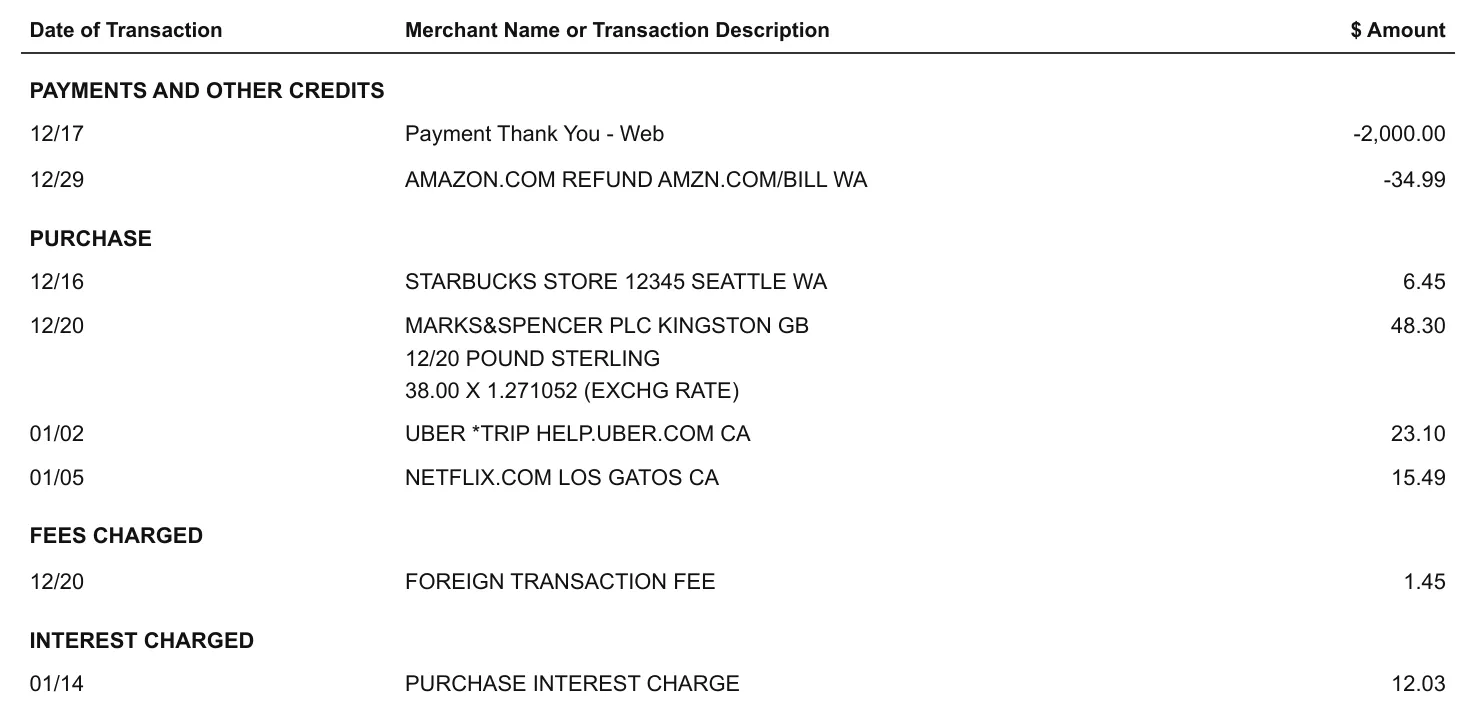
A US credit card statement. Purchases, the foreign transaction fee and interest are printed as plain numbers, the payment and the refund with a minus. Dates carry no year although the statement runs from December into January, and a purchase in pounds takes three lines.
The CSV file
Eight rows with the signs turned to your side of the account: spending negative, the payment and the refund positive, so nothing imports as income. December rows are dated 2025 and January rows 2026, and the sterling purchase is one row at the billed amount in dollars, with the exchange rate kept in the description. A card statement prints no running balance, so the Balance column stays empty.
Date,Description,Amount (USD),Balance
2025-12-17,Payment Thank You - Web,2000.00,
2025-12-29,AMAZON.COM REFUND AMZN.COM/BILL WA,34.99,
2025-12-16,STARBUCKS STORE 12345 SEATTLE WA,-6.45,
2025-12-20,MARKS&SPENCER PLC KINGSTON GB POUND STERLING 38.00 X 1.271052 (EXCHG RATE),-48.30,
2026-01-02,UBER *TRIP HELP.UBER.COM CA,-23.10,
2026-01-05,NETFLIX.COM LOS GATOS CA,-15.49,
2025-12-20,FOREIGN TRANSACTION FEE,-1.45,
2026-01-14,PURCHASE INTEREST CHARGE,-12.03,
Rows exactly as the converter returned them for this statement, not retyped.
What the CSV file looks like
Four columns and a header row, comma-separated. The currency sits in the Amount header because CSV has no field for it, and spending is negative, deposits positive — the sign convention most importers expect.
Date,Description,Amount (USD),Balance
2026-03-02,Direct Debit 4471 Acme Insurance,-120.00,1880.00
2026-03-04,Card Payment Corner Grocer,-38.40,1841.60
2026-03-06,Transfer Received J Smith,500.00,2341.60How to convert
Upload your statement
Drop in the PDF you downloaded from your bank, or a scan of a paper statement.
Choose CSV
Leave the output format on CSV — it is preselected on this page.
Download the file
Open it in Excel, Google Sheets, or import it into your bookkeeping tool.
Statements it handles
Layouts differ from bank to bank, so nothing is matched against a fixed template. An unusual statement still produces a table you can check before exporting — which is what makes it usable for bookkeepers and accountants who receive statements from every client.
PDF statements and CSV exports
A statement downloaded from your bank, or the CSV your bank lets you export. Both arrive as the same clean table.
Multi-page statements, read as one table
A statement that runs over several pages — or several statements uploaded together — is read as one continuous table, not one file per page.
Amounts and dates kept as your bank prints them
Debit and credit signs, decimal places and date formats are left as printed, so the numbers still reconcile against the statement.
Scanned, image-only PDFs, read with OCR
A statement with no text layer is read with OCR and may need a quick review — the one case where a row can come out wrong.
- CSV
- Scan
Rows are read by what they are — a date, a description, an amount — not by where they sit on the page, so a wrapped description stays with its transaction and a closing balance never becomes one. Why OCR mangles bank statements
Frequently asked questions
How do I convert a bank statement to CSV?
Upload the PDF from your bank (or a scan) above, keep CSV as the output format, and download the file. No account and nothing to install.
Can I convert a PDF bank statement to CSV?
Yes. Upload the PDF, pick CSV, and you get one transaction per row with dates, descriptions, and amounts in separate fields.
Can I convert a credit card statement to CSV?
Yes. Card statements print purchases as plain numbers and payments with a minus; the CSV turns that round so purchases, fees and interest are negative and payments and refunds positive — the example above is a real card statement converted this way. That is the convention bank-feed importers expect, so spending does not arrive as income.
Is it free?
The first 3 pages of your first upload are free, so a short statement costs nothing. Longer statements are $0.20 a page with a $3.90 minimum, and you see the first pages before paying.
Which date format does the CSV use?
YYYY-MM-DD for every row, whatever the statement printed — 03/04, 4 Mar or 04.03.2026. If an importer asks for the date format, pick year-month-day.
Why CSV instead of Excel?
CSV is plain text, so every spreadsheet and accounting tool can import it, and nothing depends on Excel being installed. If you want a formatted workbook instead, use the Excel conversion.
What happens to commas inside a description?
They are kept in the field and the field is quoted, so the columns do not break when the file is opened.
Is my statement kept after conversion?
No. The file is deleted when the conversion finishes; only the converted copy stays at your private link.
Do I need an account?
No. The converter works without signing up.