Bank statement to Excel
Upload a PDF bank statement — or a scan or phone photo of one — and download an .xlsx workbook with one row per transaction: date, description, amount and running balance in their own columns. Withdrawals and deposits printed in two columns become one signed amount you can sum, and a description wrapped over three lines stays in one cell.
Upload a file
What the Excel file contains
- One row per transaction, in the order they appear on the statement
- Date, Description, Amount and Balance columns, with the currency in the Amount header
- Money out negative and money in positive, so a SUM of the column is the net change for the period
- Amounts and balances stored as numbers, ready for SUM, SUMIF and pivot tables
- A balance column when the statement prints a running balance
- Opening and closing balances, page headers and summary boxes left out — only transactions become rows
A real conversion, start to finish
The statement
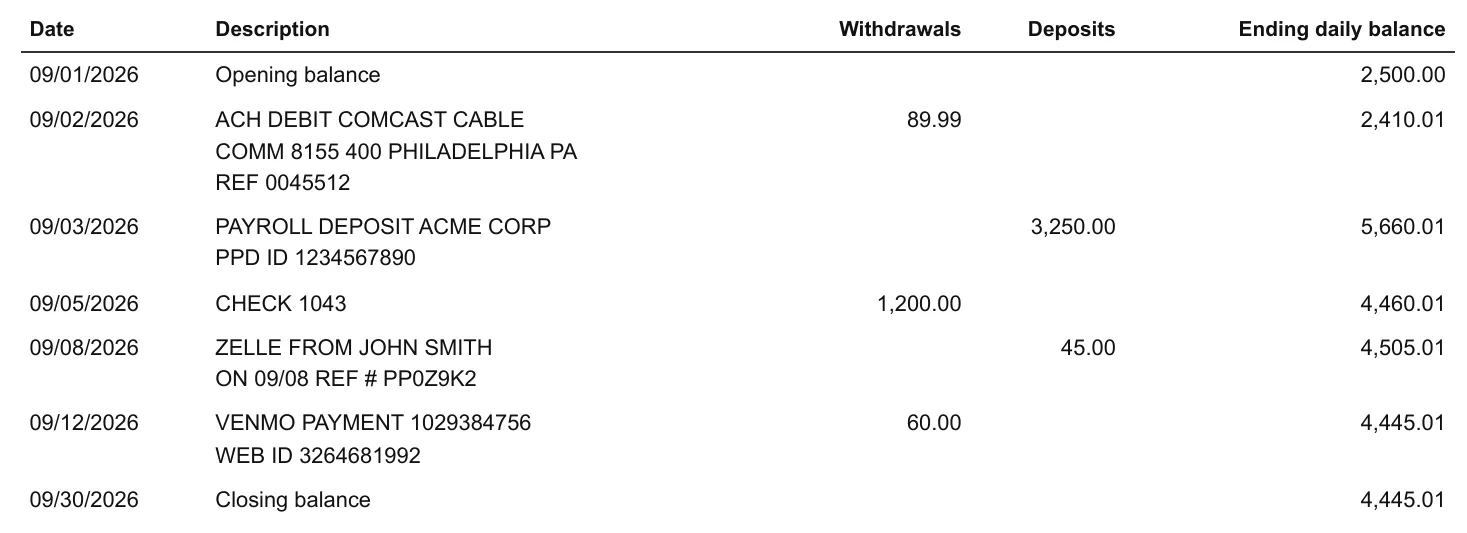
A US checking statement with separate Withdrawals and Deposits columns, and descriptions that wrap onto a second or third line. Opening and closing balances sit in the table but are not transactions.
The Excel file
Five transactions, one row each. Every wrapped description is joined into one cell, withdrawals carry a minus and deposits do not, so the two columns become one Amount you can sum, and the running balance agrees with the statement on every row.
| Date | Description | Amount (USD) | Balance |
|---|---|---|---|
| 2026-09-02 | ACH DEBIT COMCAST CABLE COMM 8155 400 PHILADELPHIA PA REF 0045512 | -89.99 | 2,410.01 |
| 2026-09-03 | PAYROLL DEPOSIT ACME CORP PPD ID 1234567890 | 3,250.00 | 5,660.01 |
| 2026-09-05 | CHECK 1043 | -1,200.00 | 4,460.01 |
| 2026-09-08 | ZELLE FROM JOHN SMITH ON 09/08 REF # PP0Z9K2 | 45.00 | 4,505.01 |
| 2026-09-12 | VENMO PAYMENT 1029384756 WEB ID 3264681992 | -60.00 | 4,445.01 |
Rows exactly as the converter returned them for this statement, not retyped.
Why copying a PDF statement into Excel goes wrong
Copy and paste from a PDF viewer, or a general PDF-to-Excel tool, keeps the page rather than the transactions: each printed line becomes a row, so a description on three lines turns into three rows and only one of them has an amount. Separate withdrawal and deposit columns arrive as two half-empty columns, and page headers and the balance summary land between the transactions.
Reading the statement as a statement avoids all three. Each transaction is found by what it is — a date, a description, an amount — so the result is one row each, signed, with nothing to delete before you sort or total the sheet. A multi-month export works the same way: upload all the statements together and they come back as one table.
How to convert
Upload your statement
Drop in the PDF you downloaded from your bank, a scan, or a photo. Up to 20 files at once, read as one table.
Choose Excel
Leave the output format on Excel — it is preselected on this page.
Download the workbook
Open the .xlsx in Excel, Numbers, or Google Sheets.
Statements it handles
Layouts differ from bank to bank, so nothing is matched against a fixed template. An unusual statement still produces a table you can check before exporting — which is what makes it usable for bookkeepers and accountants who receive statements from every client.
PDF statements and CSV exports
A statement downloaded from your bank, or the CSV your bank lets you export. Both arrive as the same clean table.
Multi-page statements, read as one table
A statement that runs over several pages — or several statements uploaded together — is read as one continuous table, not one file per page.
Amounts and dates kept as your bank prints them
Debit and credit signs, decimal places and date formats are left as printed, so the numbers still reconcile against the statement.
Scanned, image-only PDFs, read with OCR
A statement with no text layer is read with OCR and may need a quick review — the one case where a row can come out wrong.
- CSV
- Scan
Rows are read by what they are — a date, a description, an amount — not by where they sit on the page, so a wrapped description stays with its transaction and a closing balance never becomes one. Why OCR mangles bank statements
Frequently asked questions
How do I convert a bank statement to Excel?
Upload the PDF from your bank (or a scan) above, keep Excel as the output format, and download the .xlsx file. Nothing to install and no account to create.
Can I convert a PDF bank statement to Excel?
Yes — PDF is the most common input. Text-based PDFs give the cleanest result; scanned, image-only statements depend on OCR and may need a quick review before you use the file.
Can I convert a bank statement to Excel for free?
The first 3 pages of your first upload are free, so a short statement costs nothing and a longer one shows its first pages before you pay. After that it is $0.20 a page with a $3.90 minimum, and no subscription.
Will the columns line up correctly?
Transactions are read from the content of the statement rather than from fixed page coordinates, so a description that wraps onto a second line stays with its transaction instead of being cut in two or shifting the amount into the wrong column.
Can I put several months of statements into one Excel file?
Yes. Upload the statements together — up to 20 files and 500 pages in one batch — and they are read as one continuous table, so a year of statements becomes one workbook.
Does it work for credit card statements?
Yes. Purchases, fees and interest come out negative and payments and refunds positive, the same convention as a bank account, so the two can sit in one workbook. A December–January card statement printed without years gets the right year on each row.
Can I open the file in Google Sheets?
Yes. The .xlsx opens in Excel, Numbers, and Google Sheets without conversion, and it can also be imported into most accounting tools.
Is my statement kept after conversion?
No. The file is deleted when the conversion finishes; only the converted copy stays at your private link.
Do I need an account?
No. The converter works without signing up.